How to connect Shelly devices with the E.ON Happy Home app
In order to connect Shelly devices with E.ON Happy Home , you connect your Shelly cloud account with E.ON Happy Home .
This also means that if you purchased any new Shelly devices for use with E.ON Happy Home , you first need to set them up with Shelly. Pleease use the Shelly app and follow its instructions to set up a new device.
Connecting Shelly Plugs and Relays with E.ON Happy Home
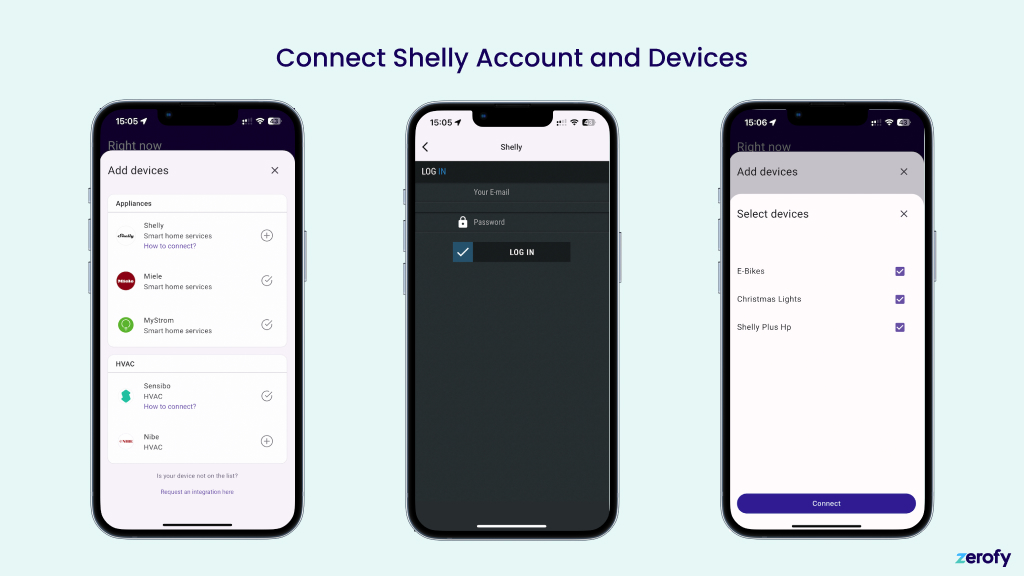
Connecting Shelly Plugs and Relays with E.ON Happy Home is simple:
- Tap on the Shelly section under HVAC and Appliances
- Enter your Shelly account credentials
- Select the device you want to connect to E.ON Happy Home
Connecting Shelly Pro 3EM Energy Meters with E.ON Happy Home
The flow is equivalent to the one described above for plugs and relays. But you start in the section Meters in the device configuration of the E.ON Happy Home app. The device selection dialog will show you only Shelly Pro EM meters and no other devices on your account.
Meter type
Main meter: Grid meter. Can be configured as bi-directional or consumption.Production: Measures solar production. Configure as sub meter with typeproduction.Sub meter: Measures any type of device as a sub meter and appears in device consumption.
For full setup details with screenshots, see System Setup: Meter Configuration.